
Tenancy Model
How UrbanFox isolates data between tenants, the Pool and Dedicated tenancy options, and what they mean for your integration
UrbanFox is a multi-tenant platform. Every API call targets a single tenant: your organisation. Understanding what a tenant represents, and which tenancy option your organisation is on, helps you design your integration correctly from the start.
What is a tenant?
A tenant is an organisational boundary. It represents one UrbanFox customer, typically a company, brand, or operating region. In the Customer API, the tenant_slug path parameter is your tenant's unique slug, which your organisation selects during provisioning, such as demo-retail. The same slug appears in every tenant-scoped request path, for example /v2/demo-retail/metrics.
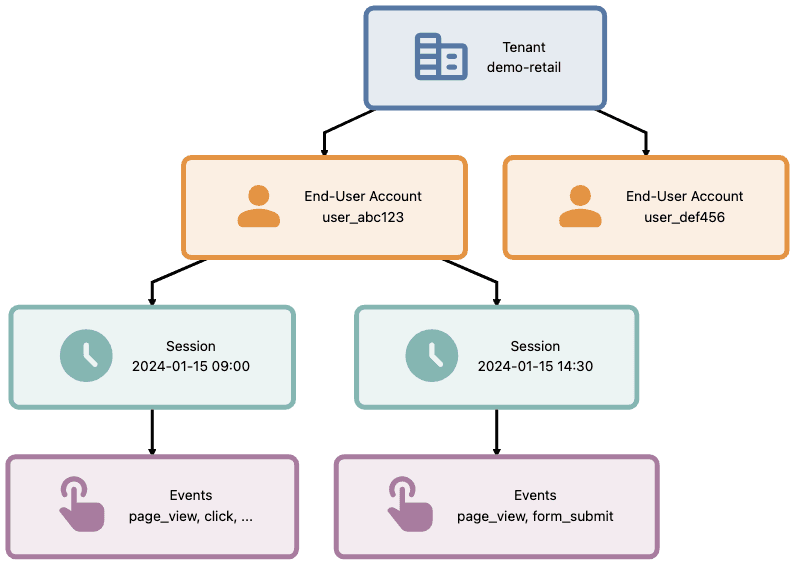
A tenant is not a user. Individual people who interact with your app are end-user accounts within your tenant. The hierarchy:
- Tenant → the organisation boundary (your company)
- End-user accounts → individual people within your tenant's app
- Sessions → time-bounded activity periods for each end-user
- Events → individual interactions captured within a session
Tenancy options: Pool and Dedicated
Every UrbanFox tenant runs in one of two tenancy models. Your plan determines which one, not anything you set per request. Either way, the API contract is identical: your integration works the same on both. You also choose a geographic region at provisioning time, and that region determines where your tenant's data resides.
Pool
Your tenant shares infrastructure with other UrbanFox tenants in your selected region. Isolation is logical. UrbanFox partitions and access-controls every request by your tenant, and your credentials only ever resolve to your own data. You cannot see another tenant, and no other tenant can see you. Pool is the default: it provisions quickly and scales with usage.
Dedicated
Your tenant runs on infrastructure provisioned exclusively for your organisation. You get the same logical isolation as Pool, plus physical isolation: your data and processing don't share capacity with any other tenant. Dedicated suits organisations with stricter compliance, data-residency, or scale requirements.
Choosing between them
| Consideration | Pool | Dedicated |
|---|---|---|
| Infrastructure | Shared within your region | Provisioned exclusively for you |
| Data isolation | Logical | Logical and physical |
| onboarding | Fast: provision a tenant and go | Longer: requires dedicated infrastructure first |
| Data residency | Your selected region | Your selected region, isolated footprint |
| Best fit | Most integrations | Strict compliance, residency, or scale needs |
| API contract | Identical | Identical |
Whichever model you're on, infrastructure placement stays behind the UrbanFox boundary. From the API user's perspective, the stable contract is the tenant slug in the request path and credentials issued for that tenant.
How isolation works (from your perspective)
Every API token belongs to exactly one tenant. The platform enforces this in two ways:
- Path scoping: API paths include your tenant slug:
/v2/demo-retail/metrics. Requests to another tenant's path return403. - Token binding: The access token carries a tenant claim and works only with its own tenant. Even if you construct a path for another tenant, UrbanFox rejects the request.
You cannot accidentally read or write another tenant's data. The platform treats cross-tenant access as a hard failure, not a filtered result. This holds identically on both Pool and Dedicated.
Implications for your integration
When UrbanFox appears in your own system model, these boundaries matter:
- One tenant = one API credential set. If you operate multiple brands on UrbanFox, each brand is a separate tenant with its own tenant slug and credentials.
- End-user accounts belong to a tenant. A person cannot exist across multiple tenants. If the same individual uses two of your brands, they appear as two separate end-user accounts.
- Events roll up to a tenant. API paths use
tenant_slug, while clickstream payloads carryglobalAttributes.tenant_idfrom the tracking snippet. Cross-tenant analytics require you to aggregate on your side. - Scopes are tenant-scoped. A
read:metricspermission applies only to metrics for this tenant, not to all tenants globally.
When you have multiple tenants
If your organisation operates multiple UrbanFox tenants (for example, one per brand or region), treat each as an independent integration:
- Separate credentials per tenant
- No shared state assumptions between tenants
- Cross-tenant views live in your own aggregation layer
The UrbanFox API has no "super-tenant" or "organisation" endpoint that spans multiple tenants. This is intentional: it keeps the isolation boundary clean and prevents accidental data leakage between brands.
See also
- Authentication Model: how tokens and scopes enforce the tenant boundary
- Event Data Model: how events, sessions, and accounts relate within a tenant
- How to authenticate: obtain a token scoped to your tenant