
Event Data Model
How UrbanFox captures and structures clickstream events, and why UrbanFox models events this way
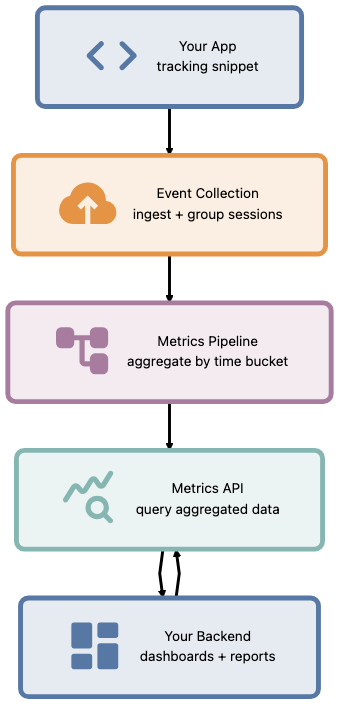
UrbanFox captures user interactions as events. These events flow through the platform, get grouped into sessions, and surface as the metrics you query via the API. This page explains the conceptual model: what an event is, how events relate to sessions and accounts, and why UrbanFox structures data this way.
What is an event?
An event is a single recorded interaction. When an end-user views a page, clicks a button, or submits a form in your app, UrbanFox captures that action as an event.
Events are the atomic unit of data in UrbanFox. UrbanFox derives everything else, including sessions, metrics, and aggregations, from events.
Each event carries:
- Tenant context: Which tenant this event belongs to. API paths use
tenant_slug; clickstream events carryglobalAttributes.tenant_idfrom your tracking snippet. - Identity context: Which end-user account generated it, when your instrumentation provides an identifier. Otherwise UrbanFox treats the activity as guest or anonymous.
- Session context: Which session the event belongs to
- Event type: What kind of interaction occurred
- Timestamp: When it happened
- Payload: Type-specific data, such as page URL, element ID, and custom properties
The event hierarchy
Events don't exist in isolation. They're nested within a hierarchy that gives them meaning:
Tenant -> End-user account or guest identity -> Session -> Events
Reading top-down:
- A tenant contains many end-user accounts
- An end-user account can have many sessions over time
- Guest activity can also have sessions before your instrumentation sends an end-user account
- A session contains many events (one browsing period)
- An event is a single interaction
Reading bottom-up:
- Every event belongs to exactly one session
- Every session belongs to an end-user account when identity is available, or to a guest identity when it is not
- Every end-user account belongs to exactly one tenant
- UrbanFox scopes all data to a tenant, with no cross-tenant event visibility
Event types
Events fall into a few broad conceptual categories, each capturing a different kind of interaction:
| Category | What it represents | Example |
|---|---|---|
| Page view | End-user navigated to a page | User visited /products/shoes |
| Interaction | End-user engaged with a UI element | User clicked "Add to cart" |
| Session start | A new session began | User opened your app after a period of inactivity |
| Custom | Application-defined interaction | User completed onboarding step 3 |
These categories are a way to reason about the data, not a fixed enumeration you filter on. The event type recorded on each event is whatever identifier your instrumentation sends, so your tracking setup, rather than a built-in list, determines the exact values, including any custom types. The platform captures and aggregates all of them the same way.
Sessions
A session groups events into a coherent activity period. UrbanFox defines session boundaries by inactivity: after an end-user has been inactive for a period of time, the next interaction starts a new session.
Sessions matter because:
- Metrics are session-based. When you query
unique_sessions, the question is how many distinct activity periods occurred, not how many page views happened. - Session starts are a leading indicator. A spike in
session_startsmeans more people are beginning to use your app, independent of how long they stay. - Guest vs authenticated sessions. When a user identifier appears in the tracking payload, UrbanFox can associate the session with that end-user account. Until the tracking payload includes identity, UrbanFox treats the session as guest activity. The metrics API response is the source of truth for guest and non-guest counts.
Why events, not page views?
Earlier analytics platforms modelled activity as "page views": one record per page load. UrbanFox uses events because:
- Single-page apps don't have page loads. Modern SPAs navigate without full page refreshes. Events capture in-app interactions that page views miss entirely.
- Not all meaningful actions are navigation. A user expanding a disclosure, dismissing a modal, or completing a multi-step form generates interactions that have no URL change.
- Events compose into any metric. Page views are one event type. Sessions, funnels, and engagement scores are all derived from the same event stream, with no separate instrumentation needed.
The trade-off: events are more granular, so the data volume is higher. UrbanFox handles aggregation on the platform side; you query pre-computed metrics, not raw events.
How events become metrics
You don't query raw events. UrbanFox aggregates the event stream on the platform side and exposes the result through the metrics API (/v2/{tenant_slug}/metrics).
You ask for a time range and a bucket size; UrbanFox returns pre-computed metrics for each bucket, such as total_events, unique_sessions, guest_sessions, and session_starts. Capture and aggregation happen for you, so your integration only ever reads the aggregated result.
Event capture: your responsibility
UrbanFox does not automatically instrument your app. You install a tracking snippet (GTM tag or direct script) that fires events to UrbanFox's collection endpoint. What gets captured depends on what you instrument.
This means:
- Granularity follows instrumentation. A conversion-focused setup might capture only conversion events, while a behaviour-analysis setup might capture more interaction detail.
- Privacy follows instrumentation. No event fires unless your code sends it. Personal data only reaches UrbanFox if your instrumentation includes it.
- Coverage follows instrumentation. If a page is not instrumented, UrbanFox has no data for it. The platform cannot capture what is not sent.
Tenant scoping of events
Events inherit the tenant boundary from the tracking configuration that captured them. The tenant_id in clickstream payloads and the tenant-scoped metrics API keep event data separated by tenant, so each tenant sees only its own captured activity.
For the broader isolation model, see Tenancy Model.
See also
- Tenancy Model: the isolation boundary that scopes all events
- Product Architecture: where event capture fits in the overall system
- How to integrate clickstream tracking: instrumentation setup
- How to query tenant metrics: querying the aggregated event data