
Product Architecture
A high-level view of the UrbanFox platform from an integrator's perspective, including what the pieces are and why they're separated
This page gives you a mental model of the UrbanFox platform as seen from outside. It covers what the major pieces are, how they connect, and why they're separated the way they are. It is here to help you understand the shape of the platform, not to walk you through any task. For that, follow the how-to guides and the API reference linked at the end. No internal infrastructure details either; just the boundaries that matter for your integration.
System context
As an integrator, you work with two surfaces, and you integrate with both directly: the Customer API and event collection. The clickstream-derived data you read through the API (metrics, cases) only exists once your frontend is sending events, so the two go together.
UrbanFox also runs a web app, a browser dashboard for human users, but it is a separate product you do not integrate with. It sits on the same backend as the API, so if your organisation also uses it, actions taken there (closing a case, blocking an account) appear through the API, and the reverse holds too. Beyond that, it does not affect your integration.
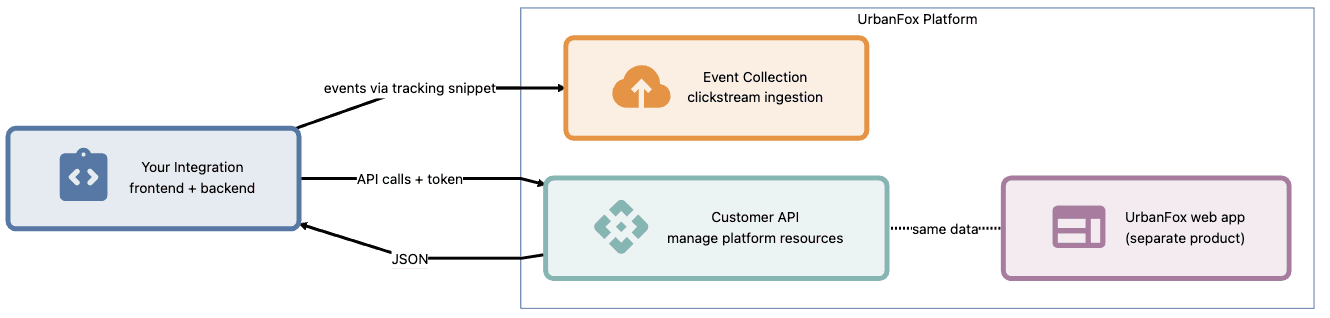
- Customer API: The direct API integration for server-to-server operations. Your backend manages platform resources (cases, accounts, metrics, credentials, authentication, and more) through this API.
- Event collection: The ingestion endpoint. Your frontend sends clickstream events here via the tracking snippet.
The two surfaces are independent. Your backend can call the API on one path. Your frontend can send events on another. Neither blocks the other. The data connects only when events are flowing. For any clickstream-based metrics or cases, your frontend must send events to event collection.
Why these surfaces are separate
A single monolithic API would be simpler to discover but harder to operate. UrbanFox separates the surfaces because each serves a different access pattern. These patterns pull in opposite directions:
| Surface | Optimised for | Access pattern |
|---|---|---|
| Customer API | Reliability, consistency, precise access control | Direct server-to-server, low request volume, high correctness requirements |
| Event collection | Throughput, tolerance for spikes, fire-and-forget | High-volume client-side, tolerates brief unavailability (events buffer locally) |
Separation provides two benefits. First, event collection can absorb traffic spikes without affecting API response times. Second, the read path (the API) and the write path (event collection) can scale and evolve independently of each other.
The Customer API
The Customer API is your primary server-to-server integration point. It prioritizes correctness over volume. Each request is carefully controlled, consistent, and access-checked. It supports the main operational workflows around:
- Fraud cases: Reviewing suspicious activity the platform has flagged, and closing cases once they're resolved.
- End-user accounts: Inspecting accounts and managing their block state within your tenant.
- Activity metrics: Querying aggregated event and session data for reporting.
- Tenant auth secrets: Retrieving and rotating the credentials used for machine-to-machine authentication.
- Authentication: Exchanging those credentials for short-lived OAuth tokens.
- Snippet configuration: Retrieving the clickstream setup values your frontend needs.
The API follows REST conventions with JSON request and response bodies, and every tenant-scoped request names your tenant in its path, using the same tenant slug as your per-tenant API host. The API Reference documents the exact endpoints; what matters here is the thinking behind them.
Design principles behind the API
- Tenant in the path, not a header. Putting the tenant in the request path makes the scope explicit and cacheable, and every request self-describing: you can see which tenant it targets without decoding anything. UrbanFox refuses any request that reaches for another tenant's data outright, rather than quietly filtering it down to nothing.
- Permissions on tokens, not on API keys. Tokens expire and carry fine-grained, per-tenant permissions: the right to read metrics, say, without the right to close cases. If a token lacks the permission an operation needs, UrbanFox rejects the request. Short lifetimes and narrow scopes together keep the blast radius of a leaked token small.
- Metrics, never raw events. You read counts and rollups (how many events, how many unique sessions, and so on), never individual event records. This keeps responses bounded and query times predictable no matter how much event volume sits behind them.
Event collection
The event collection endpoint receives clickstream data from your frontend. It is a write-only surface from your side: events go in, but raw events never come back out (you read aggregated metrics through the Customer API instead). Where the Customer API prizes correctness, event collection prizes throughput, and its characteristics follow from that:
- Fire-and-forget from the client. The tracking snippet sends events asynchronously, in batches. A failed send doesn't block or break your app.
- Tolerant of volume. It absorbs traffic spikes (product launches, marketing campaigns) without overloading your frontend.
- Eventually consistent. The platform captures events first and lets metrics settle afterward. UrbanFox groups events into sessions, and a session closes after a period of inactivity. Session-level figures, such as session counts, become final only after that period passes.
Splitting capture from query is the whole point of having two surfaces. Capture is high-volume and fire-and-forget. Query is low-volume and consistency-critical. Your frontend never waits on the metrics pipeline. Your backend never competes with event ingestion for resources.
How the pieces connect
From your perspective, data moves in one direction:
- Your frontend → Event collection: the tracking snippet fires events as users interact with your app.
- Event collection → Internal processing: UrbanFox groups events into sessions, aggregates them into metrics, and analyses those sessions to flag suspicious activity as fraud cases.
- Internal processing → Customer API: the resulting metrics and cases become available to query.
- Customer API → Your backend: you read metrics, work through cases, and manage accounts. You also manage credentials and configuration. Your backend can then feed the responses into your own tools and dashboards.
There is no direct path between event collection and the Customer API on your side. Events go in one door; aggregated data and cases come out another. The processing that joins them stays inside UrbanFox.
One key consequence: you do not create cases. The platform generates cases by analysing the sessions your events form. Through the API, you review and resolve cases rather than create them.
What this means for your integration design
- Read and write concerns stay separate. Your frontend (client-side) sends events. Your backend (server-side) queries metrics. These are architecturally distinct, and the platform's design reinforces that separation.
- Metrics are not real-time confirmation. Because metrics are eventually consistent, confirm "this event just happened" in your own app, not through an UrbanFox read.
- Credentials are surface-specific. Your Customer API token does not work for event collection, and the tracking snippet does not grant API access. Each surface has its own access method.
- Failures stay isolated. If event collection degrades, your API queries still work with previously aggregated data. If the API is slow, event capture continues unaffected. The same separation that complicates the mental model also keeps one surface's problems from spilling into the other.
See also
- Tenancy Model: how data isolation works across the platform
- Authentication Model: how tokens and scopes secure API access
- Event Data Model: the structure of captured event data
- How to integrate clickstream tracking: set up the tracking snippet on your frontend
- How to query tenant metrics: read the aggregated event data
- How to investigate and close a case: the fraud-case workflow
- API Reference: complete Customer API endpoint documentation